






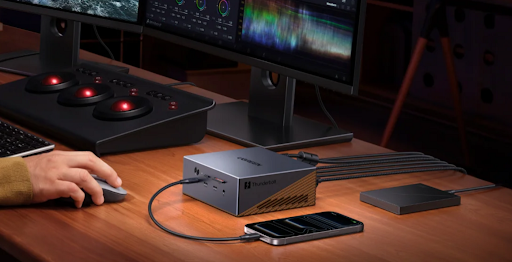
There is a familiar scene in many British homes now: a MacBook on a compact desk, an external monitor pushed against the wall, a keyboard, a mouse, perhaps a pair of headphones, a charger trailing from the floor, and a handful of cables that somehow never look as tidy as expected. Hybrid working may have matured, but the home workspace has not always kept up.
For many people, the problem is not the laptop. A MacBook Air or MacBook Pro is usually more than capable of handling the modern working day. The problem is everything around it. As soon as a portable machine becomes the centre of a semi-permanent desk setup, small inconveniences begin to multiply. A monitor cable here, a charging cable there, an external drive on the side, a card reader when needed, a dongle that disappears just before a meeting, and suddenly the clean Apple laptop experience feels far less elegant.
This is where the thunderbolt 4 dock has become one of the most underrated upgrades for MacBook users. Not because it is flashy, and not because it transforms the laptop’s raw performance, but because it quietly solves the everyday mess that builds up around modern portable computing. For people trying to create a cleaner, more flexible desk in a flat, spare bedroom, shared workspace or small home office, that may matter more than almost any other accessory.
The modern desk is smaller than the modern workflow
The average workflow has grown, but many desks have not. People now use external displays for spreadsheets, browsers, video calls, creative tools and multitasking. They connect SSDs for backups, Ethernet for stable calls, webcams for better meetings and peripherals for comfort. At the same time, many UK homes do not have the luxury of a dedicated office room. The workspace may be a corner of the bedroom, a dining table during the day or a narrow desk in a shared flat.
That mismatch creates friction. A MacBook is designed to move, but the desk setup wants to stay fixed. Every time the laptop leaves and returns, the user has to rebuild the workspace: plug in the display, attach power, connect storage, find the right adapter and hope nothing has shifted. Individually, these actions seem minor. Repeated daily, they become exactly the kind of low-level annoyance that makes a workspace feel less professional.
A thunderbolt 4 dock addresses that issue by turning scattered connections into one central point. Instead of treating the MacBook as the place where every cable must terminate, the dock becomes the desk’s permanent hub. The laptop can remain mobile, while the rest of the setup stays organised.
Why minimalism is not just about looks
Minimalist desk setups are often discussed as if they are mainly aesthetic. Social media has made clean desks, hidden cables and symmetrical monitor arrangements almost a visual genre of their own. But there is a practical reason those setups appeal: they reduce decision fatigue.
A cluttered workspace constantly asks for small bits of attention. Which cable is power? Which one is the display? Why is the SSD not connected? Where did the adapter go? Why is the webcam occupying the only free port? These are not major problems, but they interrupt the flow of work. The more often they happen, the more the workspace feels improvised.
A good macbook air dock or macbook pro dock can make minimalism functional rather than decorative. It allows the user to keep the desk infrastructure in place while reducing visible clutter. The display, charger, Ethernet, external drive and accessories can remain connected to the dock. The MacBook only needs to connect to the dock when it is time to work.
That is a small change in behaviour, but a large change in experience.
MacBook Air users: keeping portability without losing the desk
The MacBook Air is perhaps the clearest example of why a dock can be useful even for users who do not see themselves as power users. The Air is designed around portability. It is light, simple and easy to carry from room to room or between home and office. But many MacBook Air owners still want a proper desk setup when they sit down for focused work.
That is where a macbook air dock makes sense. It lets the Air keep its portable identity while giving it a more complete workspace when needed. A single desk connection can bring in a larger monitor, a keyboard, a mouse, storage and charging. The result is not a heavy workstation, but a cleaner bridge between mobility and comfort.
This is especially useful for students, freelancers, remote workers and anyone who does not want to leave a large desktop computer permanently set up. The MacBook Air remains the main device, but the desk stops feeling temporary.
MacBook Pro users: a cleaner base for heavier work
The MacBook Pro brings a different set of expectations. Many users buy it because they need more sustained performance, more screen support, more creative headroom or more professional reliability. But even a powerful MacBook Pro can feel constrained when the desk around it is chaotic.
A macbook pro dock is not just about adding ports. It is about giving the laptop a more stable home base. For photographers, designers, developers, consultants and media professionals, the dock can keep essential tools permanently available: external drives, monitors, audio equipment, Ethernet, input devices and charging.
The result is a desk that behaves more like a proper workstation without sacrificing the flexibility of the laptop. That matters because many professional users do not want to choose between mobility and a fixed setup. They want both. A dock is one of the simplest ways to make that possible.
Why Thunderbolt 4 remains a strong fit for tidy MacBook desks
The reason a thunderbolt 4 dock is particularly relevant is that it offers the right balance for many MacBook users. It is fast enough for serious everyday workflows, mature enough to be dependable and versatile enough to replace several smaller adapters.
For a tidy desk, that balance matters. A dock does not need to be the most extreme piece of hardware on the table. It needs to be stable, predictable and useful every day. If it can handle display output, charging, storage, Ethernet and peripherals through one central unit, it has already solved the biggest problem most laptop desks face.
That is why Thunderbolt 4 still feels like the sensible middle ground for a wide range of MacBook setups. It is capable enough for professional use, but not so over-specified that it only makes sense for niche workstations. For users building a cleaner home office or hybrid desk, that practicality is exactly the point.
The hidden benefit: fewer repeated movements
One underrated part of dock ownership is the reduction of repeated physical actions. Without a dock, users often plug and unplug multiple cables several times a day. That increases clutter, creates wear on ports and makes the desk feel less settled. With a dock, most of those connections stay where they are.
The laptop becomes easier to undock when leaving the house and easier to reconnect when returning. This is especially valuable for hybrid workers moving between office days and home days. The desk becomes less of a puzzle and more of a station.
It is a subtle quality-of-life improvement, but those are often the upgrades people appreciate most over time. The best desk accessories are not always the ones you notice constantly. Sometimes they are the ones that remove problems so quietly that you stop thinking about them.
Small spaces benefit most from smarter connectivity
In a large office, cable clutter can be hidden behind furniture or under a wide desk. In a small flat or compact home office, it is much harder to ignore. Every cable is more visible. Every extra adapter takes up valuable space. Every loose accessory makes the room feel less organised.
This is why docking solutions matter so much in smaller environments. A thunderbolt 4 dock can help consolidate the desk into a more intentional layout. The monitor stays connected. The peripherals stay connected. The charger stays in place. The MacBook becomes the only truly mobile part of the system.
For renters, students and city-based professionals, this can be more useful than buying a larger desk or adding more furniture. Better connectivity can make the existing space work harder.
What to look for in a clean MacBook dock setup
Choosing a dock for a minimalist desk is not only about maximum specifications. The details matter.
A good dock should have enough ports for the devices that actually stay on the desk. It should support the display arrangement the user wants. It should allow reliable charging and avoid forcing additional power bricks into the setup. It should be compact enough to sit neatly on a desk or be tucked away without awkward cable angles.
The port layout also matters. A dock with badly placed ports can still create visual clutter even if it technically works. A well-designed dock makes the cable routes logical, which helps the workspace stay tidy over time.
This is where brands such as UGREEN fit naturally into the conversation. For MacBook users who want the desk to feel cleaner rather than more complicated, the appeal is not just extra connectivity, but connectivity that looks and behaves like it belongs in a modern workspace.
A better desk changes how the laptop feels
One of the interesting things about building a better docked setup is that it can make the same MacBook feel more capable. The processor has not changed. The screen has not changed. The software is the same. But the way the machine fits into the working day improves.
With a larger display, stable peripherals, faster access to storage and less cable friction, the MacBook feels less like a portable device being stretched into desktop duty and more like the centre of a deliberate workstation. That is true whether the user has a MacBook Air or MacBook Pro.
A macbook air dock can make a lightweight laptop feel more productive at a desk. A macbook pro dock can make a professional laptop feel more organised and reliable during heavier work. In both cases, the dock improves the environment rather than the computer alone.
Conclusion
For many MacBook users, the next meaningful upgrade is not another laptop, another monitor or another productivity app. It is a better way to connect the tools they already use. A thunderbolt 4 dock is not glamorous hardware, but it solves one of the most common problems in modern hybrid working: turning a portable MacBook into a clean, reliable desk setup without drowning the workspace in cables.
For MacBook Air users, the right dock preserves portability while adding comfort and structure. For MacBook Pro users, it creates a more stable base for professional work. For anyone working in a smaller British home, shared flat or flexible office, it can make the desk feel calmer, more capable and more intentional.
The minimalist MacBook desk is not really about hiding technology. It is about making technology easier to live with. And in that sense, a good Thunderbolt 4 dock may be one of the quietest but most effective upgrades a MacBook user can make.